Watch Your Lash Course On Phone Or Tablet
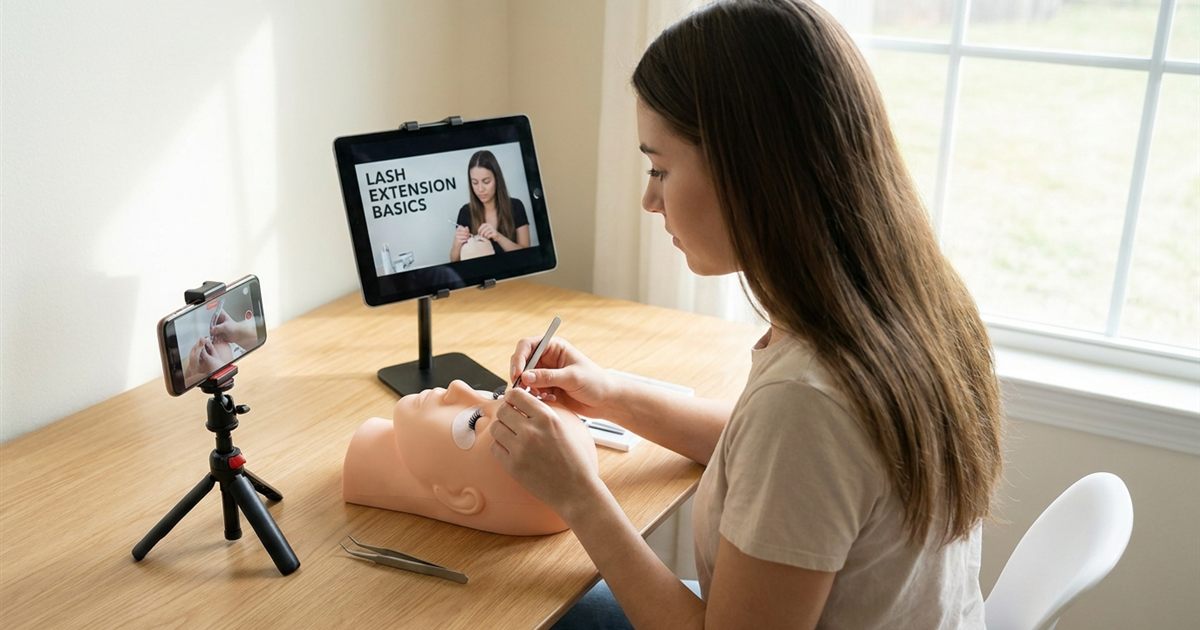
One of the most practical questions before buying an online lash course is rarely asked out loud: what do I need to watch it on? Maybe you only have a phone. Maybe a laptop that lives in the kitchen. Maybe a tablet you could set up beside your practice table. The truth is that almost any modern device can play a video course, but they are not equally good for learning a skill where the details are tiny. This guide shows what each device does well, how to arrange your space and how to avoid the small setup problems that slow beginners down.
Free Guide
Get Your Free Lash Extensions Starter Guide
A $17 value, yours free today. We'll send the guide straight to your inbox in the next minute.
You'll also get occasional lash tips by email. Unsubscribe anytime.
Can You Take A Lash Course On Any Device?
Most online lash courses stream through a web browser or an app, which means they work on a phone, a tablet or a computer. The Lash Extensions Master Course, for example, streams instantly after purchase and can be watched on any device. That flexibility is useful, but it does not mean every device is equally good for every lesson. Lash extensions are close up work, and you need to see the angle of the tweezers, the spacing of a fan and the way a lash sits on the natural lash. Screen size matters more than people expect.
If you are still weighing whether to learn online at all, how an online lash course really works explains the whole process from enrolling to finishing.
Phone: Great For Review, Limited For Learning
A phone is the device you always have with you, which makes it excellent for reviewing. You can rewatch a short lesson on the bus, recheck a step before an appointment with a practice model or read your manual while waiting somewhere. For the first viewing of a detailed technique, though, a small screen hides information. Fine details like the direction of the isolation or the position of your wrist can be hard to see.
Use your phone for: quick rewatches, reading, quiz style self checks and keeping lessons within reach. Avoid relying on it only for your first pass through a new technique.
Tablet: The Best Balance For Most Beginners
A tablet usually gives you the best of both worlds. It is light enough to move and large enough to show close ups clearly. With a simple stand, you can place it right beside your mannequin head and follow each movement. Pause, copy, play, pause again. That cycle is how most people actually learn the physical steps.
Set the tablet at eye level or slightly above, on the side of your non dominant hand, so you do not have to turn your head and lose your position. If you are working through a plan, pair it with a 30 day study plan for your lash course to decide what to watch each day.
Laptop Or Desktop: Best For Taking Notes And Studying
A laptop shines when you are studying rather than practicing. You can watch the lesson full screen, type your notes beside it and keep the manual open in another window. The bigger display also shows the smallest details of a close up. The downside is that a laptop is harder to put next to a practice table, so many learners use it for the first watch and a tablet or phone for the practice sessions.
Set Up Your Practice Space
Your device is only half the setup. The other half is the table where you will practice.
- Light: use bright, even light that does not cast shadows on your hands. Natural light from a window or a ring light helps you see what the video shows.
- Height: sit so your elbows rest comfortably on the table. Bad ergonomics ruins focus fast. Ergonomics in eyelash extension training explains how to avoid neck and wrist pain.
- Stand: use a stand or a stack of books to hold your device at a steady angle.
- Audio: earbuds help you hear soft spoken instructions without house noise.
- Tools within reach: keep your mannequin head, tweezers and supplies at arm’s length so you never have to leave the video for long.
Handling Internet And Playback Problems
A choppy video is more than annoying: it makes you miss details. If a lesson buffers, try lowering the video quality for the first pass, closing other apps and moving closer to your router. If your connection is unreliable at home, choose a time of day when fewer people share it. Because courses with lifetime access stay available, you can always return to a lesson later when conditions are better.
Another small trick is to use the playback controls well. Slow the video down for fast hand movements and rewatch tricky seconds as many times as you need. What lifetime access in an online lash course means explains why unlimited rewatching is such an advantage for a hands on skill.
A Simple Routine For Watching And Practicing
- Watch once without touching anything. Get the full picture of the lesson.
- Rewatch in short pieces. Pause after every step and copy it on your mannequin.
- Photograph your result. Compare it with the video in good light.
- Repeat the weak step. Focus on one correction at a time.
- Review on your phone later. A quick rewatch the next day helps the step stick.
If you want more ideas to turn lessons into skill, see how to practice on a lash mannequin head.
Common Mistakes With Devices
The most common mistake is watching an entire module on a small screen and then feeling lost when you reach for your tweezers. Another is practicing in dim light because the device is bright, which hides your errors. A third is leaving notifications on, which pulls you out of the lesson every few minutes. Turn on do not disturb for each session and treat it like an appointment with yourself.
Using Two Devices Together
Many learners get the best results with two screens. Keep the lesson playing on a tablet or laptop and use your phone as a camera to photograph your practice sets or record a short clip of your own hands. Watching your own clip beside the lesson shows differences you cannot feel while you work: the angle of your tweezers, the pace of your movements, how long you hold each lash.
This simple habit works like having a second pair of eyes. You do not need to share the video with anyone. Just compare, adjust and try again. Over a few weeks, the clips also become a record of your progress, which is encouraging on days when improvement feels slow.
Battery, Storage And Small Practical Details
Learning sessions can last an hour or more, so keep your device charged or plugged in. If your device is low on storage, clear space before you start, since photos and clips fill it quickly. Keep a cloth nearby to clean the screen, because adhesive and lash products can leave marks. And keep your hands clean before touching any device you use near a client or model.
Where The Lash Extensions Master Course Fits
Because the lessons stream on any device, you can start on whatever you own and upgrade your setup later. The Lash Extensions Master Course is a one time payment with lifetime access to 31 video lessons across six modules, plus a 90 plus page training manual, a Certificate of Completion and a 7 day money back guarantee. You can stream it on any device, pause and rewatch any lesson, and you are never required to buy anything extra to follow along. See the full lesson list on the course page.
Final Thoughts
You do not need special equipment to take an online lash course, but you will learn faster with the right device for each task. Use a phone for quick reviews, a tablet beside your mannequin for practice and a laptop for studying and notes. Add good light, a steady stand and a calm space, and you will turn a simple screen into a patient teacher you can return to whenever you need it.
Free Guide
Get Your Free Lash Extensions Starter Guide
A $17 value, yours free today. We'll send the guide straight to your inbox in the next minute.
You'll also get occasional lash tips by email. Unsubscribe anytime.
Frequently Asked Questions
Usually yes, since most online courses stream on any device with a browser. A phone is fine for reviewing a lesson or reading the manual, but a bigger screen is better for learning the fine details of a technique.
Keep Reading
Popular Lash Training Guides
- Minimum Age For Eyelash Extension Training
- Eyelash Extension Training Cost In 2026: Real Breakdown
- Lash Tech License Requirements By State
- Is It Hard To Learn Eyelash Extensions? Honest Answer
Ready to go from reading to doing? See the full Lash Extensions Master Course or browse all lash training guides.